
RPD
--
--
--
You can query data within 3 years
Today
Syncing today's request limits, token limits, and credit card status.
Total Cost
\$0.00
Total Requests
0
Web Searches
0
Images
0
Total Tokens
0
Input Tokens
0
Output Tokens
0
Cache R/W
0
| Model | Requests | Searches | Input Tokens | Output Tokens | Cache R/W | Images | Cost | Percentage |
|---|
| Date | Requests | Cost | Tokens | Images | Primary Model |
|---|
Update the alias shown in the top-right corner, your login email, and billing notifications
Regenerating your key immediately invalidates the current API Key. Copy the new key and update your local tool configuration.
-
Supported format: XAI API Keys starting with sk-Xvs... Only verified active Keys are retained; abnormal Keys are shown once and then removed.
The XAI platform is compatible with virtually all major AI providers and model ecosystems, supporting unified integration and flexible switching.
One entrypoint handles auth, routing, and normalization before reaching model providers.
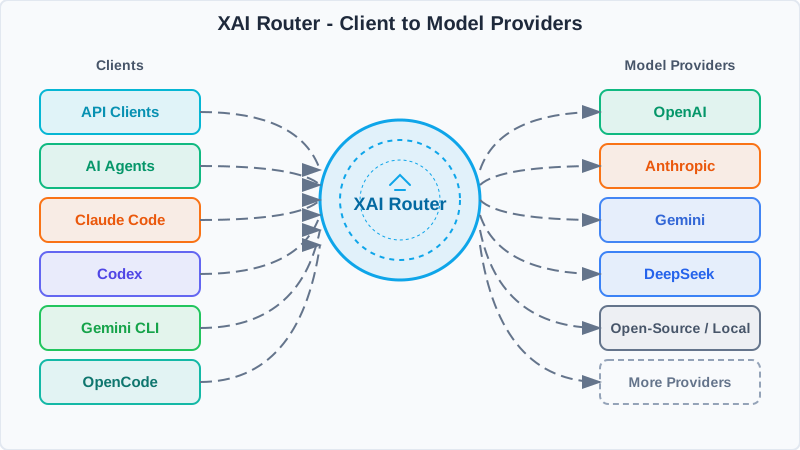
Use one XAI API key and a unified base_url.
Policies, model mapping, rate limits, and observability live in the router.
Requests go to OpenAI, Claude, Gemini, and more, then normalize on the way back.
import os
from openai import OpenAI

XAI_API_KEY = os.getenv("XAI_API_KEY")
client = OpenAI(
    api_key=XAI_API_KEY,
    base_url="",
)

completion = client.chat.completions.create(
    model="gpt-5",
    messages=[
	{"role": "system", "content": "You are AI"},
	{"role": "user", "content": "What is the meaning of life, the universe, and everything?"},
    ],
)

print(completion.choices[0].message)import os
from anthropic import Anthropic
XAI_API_KEY = os.getenv("XAI_API_KEY")
client = Anthropic(
api_key=XAI_API_KEY,
base_url="",
)
message = client.messages.create(
model="claude-sonnet-5",
max_tokens=128,
system="You are AI.",
messages=[
{
"role": "user",
"content": "What is the meaning of life, the universe, and everything?",
},
],
)
print(message.content)curl /responses \
-H "Content-Type: application/json" \
-H "Authorization: Bearer $XAI_API_KEY" \
-d '{
"model": "gpt-5.6-sol",
"input": "Explain what the Responses API does in one sentence."
}'curl /chat/completions \
-H "Content-Type: application/json" \
-H "Authorization: Bearer $XAI_API_KEY" \
-d '{
"model": "gpt-5.2",
"messages": [
{
"role": "developer",
"content": "You are a helpful assistant."
},
{
"role": "user",
"content": "Hello!"
}
]
}'curl /v1/images/generations \
-H "Content-Type: application/json" \
-H "Authorization: Bearer $XAI_API_KEY" \
-d '{
"model": "gpt-image-2.5-sunburst",
"prompt": "Generate a polished square portrait of a professional XAI AI assistant in a bright futuristic control room. No text, no logos, no watermark.",
"size": "1024x1024",
"quality": "high",
"output_format": "png"
}' | jq -r '.data[0].b64_json' | base64 -d > xai-image.pngcurl /v1/images/edits \
-H "Authorization: Bearer $XAI_API_KEY" \
-F "model=gpt-image-2.5-sunburst" \
-F "image=@source.png" \
-F "prompt=Keep the same assistant identity and pose, but make the lighting brighter and add subtle floating interface panels. No text, no logos, no watermark." \
-F "size=1024x1024" \
-F "quality=high" \
-F "output_format=png" \
| jq -r '.data[0].b64_json' | base64 -d > xai-image-edited.pngcurl /v1/messages \
-H 'Content-Type: application/json' \
-H 'anthropic-version: 2023-06-01' \
-H "X-Api-Key: $XAI_API_KEY" \
-d '{
"max_tokens": 1024,
"messages": [
{
"content": "Hello, world",
"role": "user"
}
],
"model": "claude-sonnet-5"
}'No recharge records
No digital goods orders
Unified setup notes for Codex CLI / Codex App / Grok CLI / Claude Code / OpenCode.
Unified prerequisite: all examples use the XAI Router gateway.
The page fills the compatible endpoint and current login key for each tool, so
users do not need to choose between OpenAI and Anthropic endpoints manually. Codex
writes to ~/.codex/auth.json, Grok writes to
~/.grok/config.toml, Claude Code uses
ANTHROPIC_AUTH_TOKEN, and OpenCode uses
XAI_API_KEY.
We recommend gpt-6-astra with wire_api = "responses" over HTTP
for compatibility with common network environments. The configuration includes an
x-codex-routing-hint that YAI synchronizes with the final mapped model.
On Linux / macOS, copy the one-shot command below first: the page
inserts the current XAI API Key automatically, so the user only needs to paste it into a terminal.
Both regular and plan modes use xhigh reasoning effort. The context window
is set to 872000, and Codex calculates the automatic compaction threshold
from the context window.
Manual setup only needs two files: ~/.codex/config.toml and
~/.codex/auth.json. On Windows, use
%USERPROFILE%\.codex\config.toml and
%USERPROFILE%\.codex\auth.json.
[ -e ~/.codex ] && mv ~/.codex ~/.codex.bk;mkdir -p ~/.codex

cat > ~/.codex/config.toml <<'EOF'
model_provider = "xai"
model = "gpt-6-astra"
model_context_window = 872000
model_reasoning_effort = "xhigh"
plan_mode_reasoning_effort = "xhigh"
model_reasoning_summary = "none"
approval_policy = "never"
sandbox_mode = "danger-full-access"
suppress_unstable_features_warning = true

[model_providers.xai]
name = "OpenAI"
base_url = ""
wire_api = "responses"
experimental_bearer_token = "sk-Xvs..."
requires_openai_auth = false
stream_idle_timeout_ms = 900000
supports_websockets = false
http_headers = { "x-codex-routing-hint" = "model=gpt-6-astra" }

[features]
image_generation = true
goals = true
EOF

cat > ~/.codex/auth.json <<'EOF'
{
  "OPENAI_API_KEY": "sk-Xvs..."
}
EOF

chmod 600 ~/.codex/auth.json
When copying the command above, the page automatically inserts the current
XAI API Key into both the config.toml
experimental_bearer_token field and auth.json. If
auth.json is later overwritten by Codex login, model requests still go
through XAI Router.
model_provider = "xai"
model = "gpt-6-astra"
model_context_window = 872000
model_reasoning_effort = "xhigh"
plan_mode_reasoning_effort = "xhigh"
model_reasoning_summary = "none"
approval_policy = "never"
sandbox_mode = "danger-full-access"
suppress_unstable_features_warning = true

[model_providers.xai]
name = "OpenAI"
base_url = ""
wire_api = "responses"
experimental_bearer_token = "sk-Xvs..."
requires_openai_auth = false
stream_idle_timeout_ms = 900000
supports_websockets = false
http_headers = { "x-codex-routing-hint" = "model=gpt-6-astra" }

[features]
image_generation = true
goals = true{
"OPENAI_API_KEY": "sk-Xvs..."
}if not exist "%USERPROFILE%\.codex" mkdir "%USERPROFILE%\.codex"
notepad "%USERPROFILE%\.codex\config.toml"
notepad "%USERPROFILE%\.codex\auth.json"
codexNew-Item -ItemType Directory -Force "$env:USERPROFILE\.codex" | Out-Null
notepad "$env:USERPROFILE\.codex\config.toml"
notepad "$env:USERPROFILE\.codex\auth.json"
codex
On Windows, paste the TOML and JSON blocks above into the two files Notepad opens,
save them, then run codex.
According to the
official Grok CLI settings guide,
[endpoints].models_base_url handles model discovery and primary inference requests,
while xai_api_base_url is used by image_gen and image_edit.
Set both to the same main API origin shown below, without /v1; direct API calls still use
the standard /v1/... paths.
The configuration file is ~/.grok/config.toml. On Windows, use
%USERPROFILE%\.grok\config.toml. This page inserts the current XAI API Key
automatically, so no environment variable is required.
curl -fsSL https://x.ai/cli/install.sh | bash
grok update
grok --version[models]
default = "grok-4.7"
default_reasoning_effort = "xhigh"
[endpoints]
models_base_url = ""
xai_api_base_url = ""
[model."grok-4.7"]
model = "grok-4.7"
name = "Grok 4.7"
api_key = "sk-Xvs..."
api_backend = "responses"
context_window = 500000
supports_backend_search = true
[auth]
preferred_method = "api_key"
[session]
# Optional: the official default is 85; 80 triggers auto-compaction earlier
auto_compact_threshold_percent = 80
[ui]
max_thoughts_width = 120
yolo = true
compact_mode = false
permission_mode = "always-approve"
These UI settings match the recommended local workflow: reasoning is capped at 120 columns,
compact UI mode stays off, and tool calls are approved automatically.
yolo = true together with permission_mode = "always-approve" lets Grok
modify files and run commands without confirmation; use it only in trusted projects and environments.
preferred_method = "api_key" prevents an existing Grok OAuth session from replacing
the Router Key on image-tool requests. api_key must be the XAI Router Key shown on this
page (sk-Xvs...),
not a grok.com OAuth refresh_token; a refresh token belongs only in server-side
yai Provider configuration. An inline key is stored as plaintext;
on Linux / macOS, run chmod 600 ~/.grok/config.toml. Prefer the officially supported
env_key option on shared machines.
grok inspect
grok models
grok --model grok-4.7 --output-format json -p 'Reply with XAI_GROK_OK only'
The context_window = 500000 value follows the current
official Grok 4.7 model page.
supports_backend_search = true applies to this site's yai-to-grok-cloud forwarding path.
Claude Code integration is primarily environment-variable based.
The following examples map Claude defaults to
gpt-5.6-sol using
.
Order: copy the environment variables for your shell first, then
run claude.
export ANTHROPIC_AUTH_TOKEN="sk-Xvs..."
export ANTHROPIC_BASE_URL=""
set ANTHROPIC_AUTH_TOKEN=sk-Xvs...
set ANTHROPIC_BASE_URL=
$env:ANTHROPIC_AUTH_TOKEN="sk-Xvs..."
$env:ANTHROPIC_BASE_URL=""
claude
Verify with: claude
OpenCode should use the global config file
~/.config/opencode/opencode.jsonc (Windows:
%USERPROFILE%\.config\opencode\opencode.jsonc).
Write the JSONC below into the config file, then set
XAI_API_KEY in your shell and run the
verification command.
Order: copy the Responses API config first, then copy the shell command for your OS.
{
  "$schema": "https://opencode.ai/config.json",
  "model": "openai/gpt-5.6-sol",
  "small_model": "openai/gpt-5.6-sol",
  "provider": {
    "openai": {
      "options": {
        "baseURL": "",
        "apiKey": "{env:XAI_API_KEY}"
      },
      "models": {
        "gpt-5.6-sol": {
          "headers": {
            "originator": "opencode"
          }
        }
      }
    }
  },
  "agent": {
    "title": {
      "options": {
        "reasoningEffort": "none"
      }
    },
    "build": {
      "variant": "xhigh",
      "options": {
        "reasoningSummary": "detailed",
        "textVerbosity": "high"
      }
    },
    "plan": {
      "variant": "xhigh",
      "options": {
        "reasoningSummary": "detailed",
        "textVerbosity": "high"
      }
    }
  },
  "permission": {
    "*": "allow",
    "external_directory": "allow",
    "doom_loop": "allow"
  }
}export XAI_API_KEY="sk-Xvs..."
opencode debug config
opencode run "hello"set XAI_API_KEY=sk-Xvs...
opencode debug config
opencode run "hello"$env:XAI_API_KEY="sk-Xvs..."
opencode debug config
opencode run "hello"
Verify with: opencode debug config (config) and opencode run "hello" (request)
This account has no sub-accounts
This action cannot be undone. The sub-account Key will be immediately invalidated.
Loading billing data...
Please verify network access and API permissions, then retry
Total Cost
$0.00
Total Requests
0
Web Searches
0
Images
0
Total Tokens
0
Input Tokens
0
Output Tokens
0
Cache R/W
0
Compare sub-account request and spend distribution to flag anomalies quickly.
| ID | User | Requests | Searches | Input Tokens | Output Tokens | Cache R/W | Images | Highest-Cost Model | Most Requested Model | Spend | Spend Share | Request Share |
|---|
Summarize request share and cost structure to pinpoint primary cost drivers.
| Model | Requests | Searches | Input | Output | Spend | Request Share | Spend Share |
|---|
Review daily totals, model share, and cache activity across the selected range.
| Time | Action | Target | Details | IP |
|---|
Loading logs...
No activity logs available
Please keep this key secure, it will be used for sub-account API authentication
Tip: Please notify the sub-account owner to check their email for the API key
Sub-account Editor